
What this feature does:
Automations let teams choose which automation service handles replies: AI Replies Assistant, Basic Replies, or Automated Flows.
When to use it:
Use this page when you need to turn automation on, set service priority, and control WhatsApp flow behavior.
How to use it:
- Open Automation.
- Enable Automation Active to allow automation for new conversations.
- Enable or disable Prioritize WhatsApp flow over AI based on your setup.
- In Response Sequence Priority, set the order for:
- AI Reply Assistant
- Basic Replies
- Automated Flows
- Save settings.
Expected result:
Automation is active and the system follows your configured service priority when replying.
Important notes:
- If a flow is already active for a contact, the normal response sequence may not be followed.
- When Prioritize WhatsApp flow over AI is enabled, WhatsApp flow becomes the primary automation on WhatsApp.
- AI can still handle other connected channels when WhatsApp flow priority is enabled.
- Service behavior depends on enabled modules and workspace permissions.
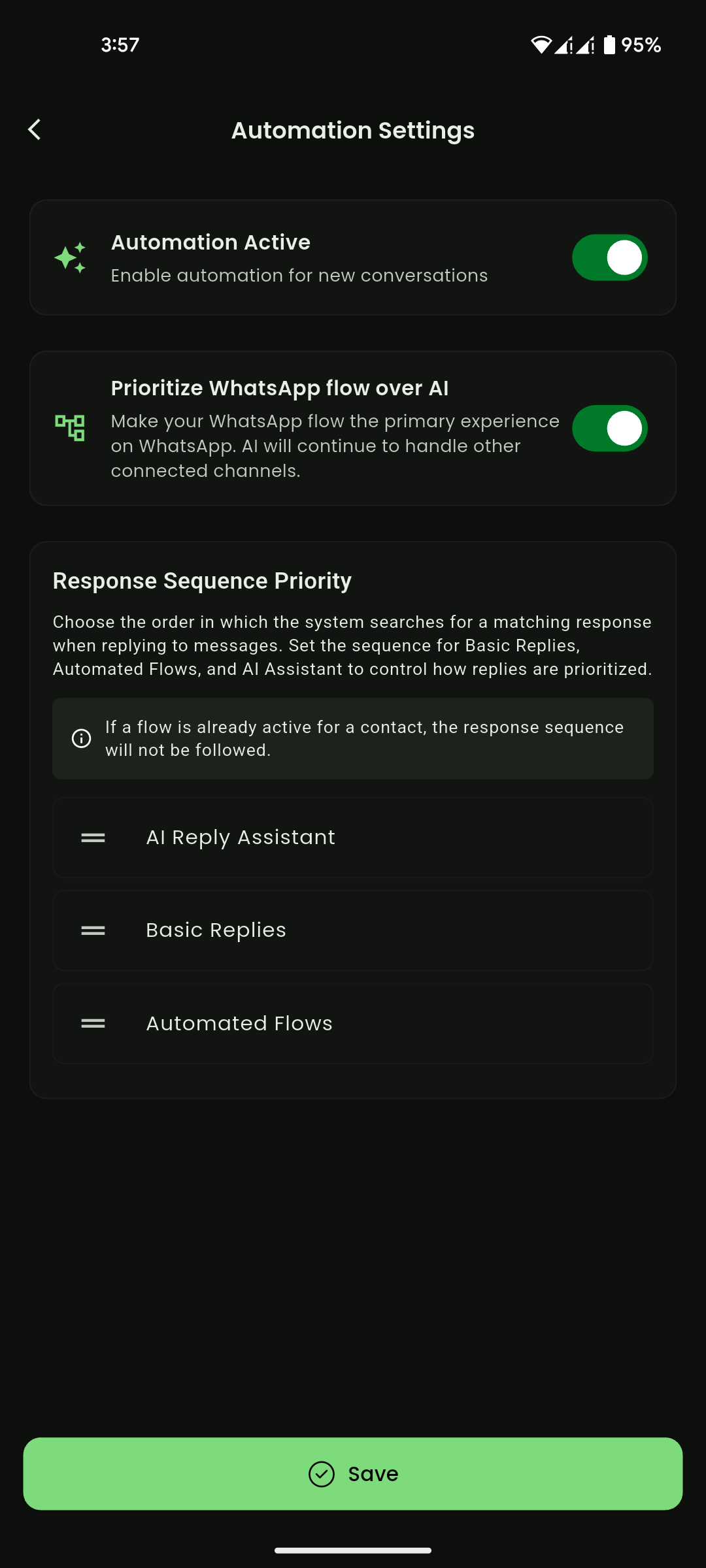
Mobile View
Automation services
Use these pages to configure each automation service:
Service order recommendation
Set the sequence according to your business rule strategy, for example:
- Basic Replies (exact trigger match)
- Automated Flows (guided journeys)
- AI Reply Assistant (fallback smart response)